Monday, 8 February 2010

Lumix LX3 – shooting raw


Imported Photos 00032


The possibility offered by the camera to shoot Raw, with the further option to have the JPEG in various formats, is a BIG plus. This in conjunction with the Leica lens makes it a killer camera, although to achieve the full potential in terms of image quality it inevitably requires some post-processing.

Much has been written about Panasonic RW2 format. That it applies some lens correction that goes missing if using other programmes than Silkpix. That it applies some degree of noise reduction. Etc. etc.

C-net Asia suggests that setting the Jpeg noise reduction and sharpening to minimum in the mode menu would also allow better post-processing for the RW2 files.

1.1. Codecs and conversions

Anyway it took some time for the RW2 format used by the LX3 to become supported by the main photo editing software programmes and it remain unsupported  by Mac OS (although Silkpix and Photoshop for Mac function with RW2).

For Mac OS users you have can to use Jpegs or convert RW2 to DNG or TIFF.

[Update 02/10/2010 Apple add compatibility for LX3 and D-Lux4Digital Camera RAW Compatibility Update 3.0]

For Windows to display RW2 images on Windows Vista and 7 get the LUMIX RAW Codec 1.0 here

For other Windows WIC enabled OS, you may use WIC RAW Codec pack

Windows live photo gallery can convert RW2 into Jpegs, MS own format WMP or HD photo as well as TIFF. (go to FILE>Make a copy> save as type)

Similar approaches can be found in other free photo viewer programmes (such as Irfan, Fastone, etc.).

DNG conversion can be done through Adobe photo manipulation software. Adobe stand-alone and free DNG converter can be found here also for Mac OS.

Arcsoft raw viewer for WIN also allows to display raw files under WIN OS but does not cover Panasonic RW2

1.2. Example of workflow

Shoot raw (or if you need immediate results and have space also JPEG better quality)

Use any programme that you like. Converting RW2 to JPEG, DNG or Tiff is now fairly common place.

Normally if I shoot both Raw and Jpeg, I would use the jpeg for all practical purposes such as small prints, internet posting, emailing etc.

For this purposes I would intervene little or not at all on the image relying on properly exposed shot. For small format: a bit of contrast and sharpening and some cropping may be necessary, some noise reduction also.

Basically I would convert to jpeg only at end of processing or not at all, as my main aim is to use this longer but more qualitative method to execute my own prints.

Before that I would typically adjust exposure, contrast, and remedy blown highlights as much as possible (which inevitably with this sensor is what I spend on more time than I would wish).

With Lightroom, I use some handy presets notably for Black and White conversion. I find free presets useful especially when they are already organized into a workflow structure (for WB, Tone, highlight/Shadows, midtones, etc.). Then I would adjust perspective and crop through Photoshop. Noise reduction can be done possibly using external programmes such as Noiseware or Noiseninja.

Thursday, 4 February 2010

Nikon CMOS based DX DSLR


2010-02-05_190949

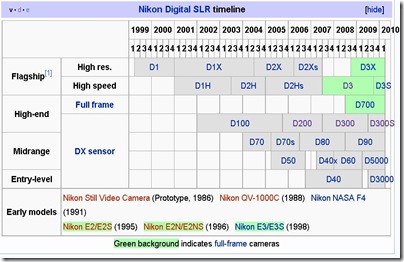
The current line up of Nikon cropped sensor DSLR (DX) is based around a  12.3 mpix CMOS sensor coupled with a new 14 bits processor (Expeed in Nikon terminology).

This sensor/processor combination has been implanted first in the D300 released in 2007 alongside the similar technology full frame CMOS sensor camera the D3. It was used as a basis for the expert model D90 (2008) and the entry-amateur model d5000 (2009). The D300s constitute an update of the 2007 model, which include video capture and some other minor improvements.

The D300-based series described above constitute a substantial upgrade compared to its predecessor based on the sensor/processor combination initiated on the D200. Please note that D80 and d3000 are also based on this architecture.

Main differences between D300 and D200

  D200 D300
  frontview-001 2010-02-05_192643
sensor CCD 10.2 mpix CMOS 12.3 mpix
processor 12 bits 14 bits
LCD low res 2.5”/230k high res 3”/920k
AF areas 11 51
max fps 5 7 (8 wt grip)
meter same same
live view No Yes
sensor cleaning No Yes
D-lighting No Yes
max iso 100-3200 100-6400
max usable iso 800 1600
viewfinder 95x 94x

Substantial improvements  include

  • Better low ISO and dynamic range performance
  • Better, bigger and higher res LCD (3”/920k)  for  D300/300s/90, smaller res but movable LCD for d5000
  • Better battery performances (with for most model same type of battery EN-EL 3e for D200/300/300s/90)
  • In camera corrections like Dynamic Range optimization (D-lighting) or for lens defect like lateral fringes
  • Introduces live view and video capability (except D300)

The three main models currently available with the 12.3 Cmos sensor differ mainly in built and mechanical aspects which affect price and weight, the image quality is largely comparable.

These are the main differences

D300S

Same as D300 plus

  • HD Video capture (720p/24fps), stereo input,
  • Dual card slot (CF+SD)
  • Live view with dedicated button and artificial horizon

D300

Main differences vs D90/D5000

  • Bigger viewfinder
  • More dedicated buttons
  • More sophisticated metering sensor
  • Can matrix meter manual lenses
  • Heavier and more weather resistant mostly metal body
  • High speed operation and frame rate
  • Faster and more precise AF (51 points)

D90

Main differences with D300

  • Smaller and lighter plastic body – not sealed
  • Smaller finder
  • But same LCD screen
  • Slight advantage in high ISO performance
  • Cannot meter with manual (non-chipped) lenses
  • Less precise 11 areas AF system
  • Retains two control wheels (thumb and index) controls
  • Uses SD card

D5000

Main differences with D300/D90

  • Lower res LCD movable
  • No AF motor in body, AF only AFS lenses
  • Just one control wheel

 Main differences between D300/D90 and D5000

  D300 D90 D5000
Body 2010-02-05_192643
finder 94x/100% 94x/96% 78x/95%
AF 51 11 11
LCD high res 3”/920k high res 3”/920k 2.7”/230k moving
Meter 1005-pixel RGB 420-pixel RGB 420-pixel RGB
meter Ai/Ais Y N N
Weight empty 840g 620g 560g
Price 1200-1500 700-900 500-700

Please note that D200 and D300 share a similar chassis based on F100. D80 and D90 share similar chassis based on F80.

 2010-02-05_184910

source wikipedia

Images DPreview, DxO

Tuesday, 22 December 2009

Some Notable Compact

Preliminary remark:

Nearly all compact have small 1/2.33'' CCD Sensor that except S90/G11/LX3 which have a 1.6"-1.7" CCD that provide for better image quality and less noise.

The main characteristic that I have taken into account is Image Quality and handling.


- Canon S90 (10MP, 28-105mm, 3"/461k screen, 400-500 Euro/$)

Very compact (pocketable), very good handling (dedicated function rings), highly customizable maybe a bit complicated, possible to shoot raw.

See good review at Enticing the light see also part 2 and part 3.


- Other Canon Ixus (in US Powershot Elph)

All good, very compact, stylish and user friendly.

My favourite is the Canon Digital Ixus 200 IS (in US Powershot SD980 IS Digital ELPH) (12MP/24-120mm/3" TOUCH screen/300E/$) see product tour

The specs similar to S90 but less controls and smaller sensor (= more noise), touchscreen is a plus


- Panasonic Lumix LX3 (10 MP, 24-60 mm, 3"/461k screen, 400-500 Euro/$)

(NB Leica D-lux4 is 95% the same camera)

Not as compact, highly customizable, raw and/or jpeg shooting, not for beginners, complex menus, but very good IA auto mode, very good lens but max tele only 60mm.

Read LX3-S90 comparison (here)

Model to be updated or replaced in 2010?

See video reviews LX3


- Some other Lumix (same chassis = 24mm deep, weight +/- 200gr)

TZ7 (in US Lumix DMC- ZS3) = user-friendly - 10 MP great screen 3"/460k pixels - lens 25-300 / HD video (300 Euro/$)

TZ-6 (in US Lumix DMC- ZS1) = same as above screen 2.7"/230k pixels - (250 Euro/$) - older processor

ZX-1 (in US Lumix DMC- ZR1) = same as above 12 MP lens 25-200, 2.7"/230k pixels - best cost/quality ratio (250 Euro/$) latest processor/ great lens resolution (4 asph)

- Samsung WB1000 (in US TL320) 12MP, 24mm, 3"/OLED screen (super!!) a little less image quality but good (250 Euro/$)

- Sony WX1 (12MP, 24-120mm, 2.7"/230k screen, 300 Euro/$)

Stylish, user friendly, good low light performance, good lens resolution, image quality good but not the best.

- Fuji FinePix F70 EXR (10MP, 27-270mm Lens, 3"/241K screen, 300 E/$)

High dynamic range and good low light performance. I tried it briefly, performances are good but not significantly different from other compact in casual shooting. Possibly would require more tweaks and post processing to deliver full potential.

Tuesday, 1 December 2009

Monday, 19 October 2009

What's a good point and shoot digital camera nowaday?

The Attack of the LX3 Clones

Any 4 megapixel camera will do for printed press

Maybe you want camera with wide lens 28mm or even 24mm

In principle, all Canon are good

compact: try new S90 (450$) - very good I want it - check sample pix

A little bigger is the Canon Powershot G11 (600$) - Best all round compact?

Also good Samsung W1000 (TL 320 in US) with 24mm and super OLED screen (cool)


And amazing screen demo


Panasonic TZ7 is a good zoom compact - if you need more zoom reach

If you want cheap (500$) reflex the new Pentax KX is cool - you can get it in any color... in Japan...

Maybe also buy extra flash if shooting a lot indoor (onboard flash never a great solution check camera with flash shoe - G11 has it)

or maybe you can get one of these cameras that can send directly to blog, facebook or email

but you can do the same with a special SD memory card called eye-FI (a bit pricey but how cool is it? - maybe you want the pro version)

Tuesday, 16 June 2009

Olympus EP-1 Digital Pen


NEW COMPACT CAMERA with INTERCHANGEABLE LENSES

CAN MOUNT LEICA OR NIKON VIA ADAPTER

available 13 July

Price US : 700$ - body only; 800$ - with 14-42 zoom; 900$ - with 17mm f 2.8 prime

Europe : 749 € (avec 14-42mm), 849 € (avec pancake 17mm et viseur optique), 949 € (avec 14-42mm et pancake 17 mm).

NB also Panasonic to release 20mm f 1.7 this autumn.

Press release

http://www.dpreview.com/news/0906/09061601olympusep1.asp


Previews

http://www.dpreview.com/previews/olympusep1/

http://www.dcresource.com/reviews/olympus/e_p1-review


Suggestion

Get EP-1 body + adapter leica M to micro 4/3

Get any wide M-mount lens you can get your hands on, including Voigtlander 12 (screw mount plus screw to M adapter) and 15 mm in M mount

(Please do check that lenses depth is compatible before mounting)

Work with manual lenses probably similar to Panasonic G1: need to select manual lens in menu and then live view zoom on part of scene to facilitate focusing. Focus confirmation.

Pluses

Compact, smart and cute

good resolution 12mpix

Video HD 720p 30 i/s

Sensor based dust shake system doubles as image stabiliser - works with any lens

Can work in permanent live view without any delay

Interchangeable lenses - quicker operation operation, incl. manual manual focus

Digital level

SD card (thank you!)

Good handling (padding in front, selection dial on back, etc.)

Minuses

No optical or electronic viewfinder

need to buy separate optical finder (retro look - but not practical with zoom)

No total black finish

Metal body but not sealed for dust and moisture

Not appealing for wide shooters as X2 sensor magnification factor - 25mm lens is a normal (50mm equivalent)

On other hand using tele is advantaged by image stabilisation and X2 sensor magnification, but composing a tele shot with live view is not that practical

Big LCD 3", but normal resolution 230k compared to latest Nikon/Canon 920k