
These are my personal considerations after using the camera (and enjoying it) for over a year.
Points that could be improved
Mechanically while it’s good to have dedicated buttons, including the partially programmable Fn button, the controls and buttons should be reinforced. Without going to Nikon’s length (in its SLRs) of securing all switches, the mode dial is often pointed as a command that moves out of position too easily. The same could be said to a lesser extend for the AF selector on the side of the camera.

The aspect ratio selector on the top of the lens is in my experience less prone to misplacement. Concerning this command, while useful, I feel that it could be better used for something else. At the beginning I was playing a lot with it changing format but I quickly realized that if your aim is to make prints the 3/2 format is all you need. The lens is quite wide already and can be complemented with an additional wide angle lens. So you can frame your shot as large as possible and then crop if needed during post production phase.
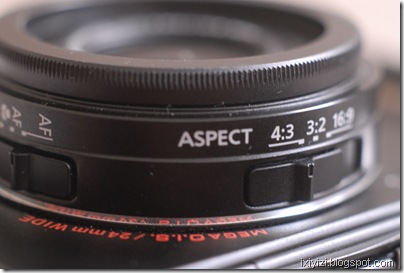
Instead I think that one area that could be improved would be the zoom controls to allow user to choose exactly which lens setting they would like to use. The S90 allows this though its lens ring. Maybe the lens aspect ratio switch could be made reconfigurable so that it could at least mark the most common intermediate focal lengths (28, 35 and 50) 24 and 60 are already given by the zoom extremes.
Continuing on the lens, the lens cap is often mentioned as an issue as most people would prefer to have a retractable system. A solution is using the Ricoh cap (see video).
Frankly for me this is a lesser problem that having to remove the lens ring cover every time I attach the wide converter. Also Panasonic may have had its priorities wrong in this area as the cover is metal and the screw on the lens is plastic. The screw should be metal. It should be possible to mount the lens cap when the filter ring is exposed (like in any lens). Or was this done on purpose to avoid having people putting filters directly on the lens that would block the zoom functioning…
For any future model, I would invite engineers to spend some time on the lens casing area.
In any case I have developed a reflex (no pun intended) when I switch on the camera I systematically check that the mode selector and the lens switches are in the desired position.
Use of wide lenses complement
Selecting the lens conversion option in the REC menu freezes the lens in its widest position so you are stuck with a fixed wide lens. I never use this function as I prefer to continue using the zoom at the price of increased distortion, which I can possibly try to correct in Photoshop later, if at all needed. Of course, I try not the use the wide conversion lens when I want no distortion at all such as for portraits. For buildings, while I sometimes like to use the wide exaggerated perspective on purpose, most of times I try to use the center of the image to allow to compensate for lens distortion and subsequent cropping in post production.
In any case to shoot architecture correctly, one should use a tilt-shift lens with another camera. Interestingly, a for micro 4/3 an adaptor ring has been produced by a third party company that allows to mount many different lenses and tilt and shift them to some extend (see this site)
Instead I set the “ext.viewfinder” option in the menu to ON as this allows to switch off the display. Frankly, while this makes sense in principle, in the next revision of the firmware they could get rid of this, just allow users to switch off the LCD when they want.
Lumix converter (x 0,75 = 18mm equiv.) I have not tried as I consider it too expensive (200$). However this is the only lens complement that can be corrected in camera by selecting lens conversion in the REC menu. But that freezes the lens in its widest position so you are stuck with an 18mm equivalent lens albeit corrected. Of course you can choose not the use the electronic correction and benefit from the flexibility of the zoom but then you can use another cheaper conversion lens.
Nikon WC-E68 (x 0,68, approx 16mm equiv.) distorts more at edges so try to allow margin to crop. Image quality at center is good. The lens is heavy (relatively speaking). Turns the camera lens into a 16-40mm lens.

Other Third Party (Raydiox and other on Ebay) I have one that is no brand (glass make) intended for video. It has a 0.45x enlargement which makes for approx 11mm equiv. has lot of distortion but turns the camera into an 11-27 mm zoom f2-2.8 (difficult to beat…)
What I like
- The lens: for its reach. let’s not forget this was the first compact camera with a max 24/2 zoom lens. For its resolution/contrast compromise close to Leica classic lenses, colors are natural and pleasantly saturated. With this lens the camera is a killer in low contrast situations. In high contrast scenes, the sensor tends to burn the highlights…
- The LCD screen, better than those found on many DSLR and nearly all compact with just a handful of exceptions (most Lumix upscale compacts e.g. TZ7, S90 and G11, and…that’s it).
- The customization menus, (especially after the addition included in firmware release 2.1.) notably the choice of 4 aspects ratios, white balance bracketing, which in turns may make the camera a bit complicate at first and for beginners.
- Automatic (IA) mode gets great exposures – it’s the only mode in this camera that nearly never burns the highlights. New High-Dynamic scene mode is also great.
- I-Exposure mode, which can be configured on the Fn button has three positions. Does not apply to raw images but cannot be used if shooting raw + jpeg, as it probably it would reduce frame rate. On Jpegs it increases noise significantly. Images taken that way (in most cases) can easily be treated with noise reduction software in post production, which mean that probably a noise treatment could be done onboard possibly
- Macro capacity: this camera has an impressive macro capacity with minimum focusing distance of 1cm (0.03 feet) in wide position, good macro AF performance.

Desired features in future product updates/iterations
Contrary to many users, I don’t mind if a camera with these potentials in terms of image and controls gets bigger and bulkier. Even bigger than EP/GF 1, which by the way inherit many aspects of the LX3, one being the lack of view-finder...
Ideally, LX3’s successor would mainly have to improve the sensor’s dynamic range, by incorporating new developments like backside illuminated image sensor and maybe better definition HD video. And possibly extending the zoom tele range to 75 to 85mm to allow for a real portrait capability, especially if max aperture remains f2.8.
But Panasonic may also consider enlarging its Lumix range toward bigger model in the rangefinder format which could take the following form:
Reviving the Porro prism rangefinder design (reviving the DMC-L1/E-330 chassis) with a 4/3 lens mount updating the electronic a big 3,5”/931k LCD screen, redundant and customizable controls, including click wheel on the back, joystick selector, double processor, ideally one only dedicated to image processing and one for AF, exposure and other camera controls.
[Incidentally 43rumors is asking today “Why not copy the L1 design to create a "rangefinder" styled MFT camera?” …]
A fixed zoom similar to the lens of the LX3 possibly redesigned for a bigger sensor micro 4/3 or even APS sized, with EVF finder on side, such a camera could be also sold by Leica. I think I would buy that camera if remain below 1000$ price tag. Maybe a little more, if really great lens and double core.
- As in many cameras (M9 anyone?), just put two processors
- Tripod socket off center – requires adapter
Shooting with one hand is of course possible and easier when using a compact camera. With your right hand you can control
- Shutter release,
- Zooming switch
- Mode selector
- Focus button and
- Joystick with your thumb to access quick menu
It is difficult if not impossible for me to hold the camera safely and operate the other buttons on the back – which makes accessing the menu while holding the camera with my right hand quite impossible.
The AF selector is not reachable. Although I understand that it is position on the left side to avoid inadvertent operation, I think it could be placed on right side, given that it can get misplaced during manipulation of the camera anyway.
Overall, I think I would welcome a bigger hand-grip….


