Showing posts with label Panasonic. Show all posts

Monday, 8 February 2010

Lumix LX3 - Handling

Imported Photos 00002

These are my personal considerations after using the camera (and enjoying it) for over a year.

Points that could be improved

Mechanically while it’s good to have dedicated buttons, including the partially programmable Fn button, the controls and buttons should be reinforced. Without going to Nikon’s  length (in its SLRs) of securing all switches, the mode dial is often pointed as a command that moves out of position too easily. The same could be said to a lesser extend for the AF selector on the side of the camera.

DSC_0948

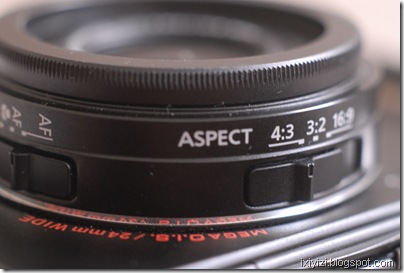
The aspect ratio selector on the top of the lens is in my experience less prone to misplacement. Concerning this command, while useful, I feel that it could be better used for something else. At the beginning I was playing a lot with it changing format but I quickly realized that if your aim is to make prints the 3/2 format is all you need. The lens is quite wide already and can be complemented with an additional wide angle lens. So you can frame your shot as large as possible and then crop if needed during post production phase.
DSC_0986

Instead I think that one area that could be improved would be the zoom controls to allow user to choose exactly which lens setting they would like to use. The S90 allows this though its lens ring. Maybe the lens aspect ratio switch could be made reconfigurable so that it could at least mark the most common intermediate focal lengths (28, 35 and 50) 24 and 60 are already given by the zoom extremes.

Continuing on the lens, the lens cap is often mentioned as an issue as most people would prefer to have a retractable system. A solution is using the Ricoh cap (see video).


Frankly for me this is a lesser problem that having to remove the lens ring cover every time I attach the wide converter. Also Panasonic may have had its priorities wrong in this area as the cover is metal and the screw on the lens is plastic. The screw should be metal. It should be possible to mount the lens cap when the filter ring is exposed (like in any lens). Or was this done on purpose to avoid having people putting filters directly on the lens that would block the zoom functioning…

For any future model, I would invite engineers to spend some time on the lens casing area.

In any case I have developed a reflex (no pun intended) when I switch on the camera I systematically check that the mode selector and the lens switches are in the desired position.

Use of wide lenses complement

Selecting the lens conversion option in the REC menu freezes the lens in its widest position so you are stuck with a fixed wide lens. I never use this function as I prefer to continue using the zoom at the price of increased distortion, which I can possibly try to correct in Photoshop later, if at all needed. Of course, I try not the use the wide conversion lens when I want no distortion at all such as for portraits. For buildings, while I sometimes like to use the wide exaggerated perspective on purpose, most of times I try to use the center of the image to allow to compensate for lens distortion and subsequent cropping in post production.

In any case to shoot architecture correctly, one should use a tilt-shift lens with another camera. Interestingly, a for micro 4/3 an adaptor ring has been produced by a third party company that allows to mount many different lenses and tilt and shift them to some extend (see this site)

Instead I set the “ext.viewfinder” option in the menu to ON as this allows to switch off the display. Frankly, while this makes sense in principle, in the next revision of the firmware they could get rid of this, just allow users to switch off the LCD when they want.

Lumix converter (x 0,75 = 18mm equiv.) I have not tried as I consider it too expensive (200$). However this is the only lens complement that can be corrected in camera by selecting lens conversion in the REC menu. But that freezes the lens in its widest position so you are stuck with an 18mm equivalent lens albeit corrected. Of course you can choose not the use the electronic correction and benefit from the flexibility of the zoom but then you can use another cheaper conversion lens.

Nikon WC-E68 (x 0,68, approx 16mm equiv.) distorts more at edges so try to allow margin to crop. Image quality at center is good. The lens is heavy (relatively speaking). Turns the camera lens into a 16-40mm lens.

Other Third Party (Raydiox and other on Ebay) I have one that is no brand (glass make) intended for video. It has a 0.45x enlargement which makes for approx 11mm equiv. has lot of distortion but turns the camera into an 11-27 mm zoom f2-2.8 (difficult to beat…)

What I like

- The lens: for its reach. let’s not forget this was the first compact camera with a max 24/2 zoom lens. For its resolution/contrast compromise close to Leica classic lenses, colors are natural and pleasantly saturated. With this lens the camera is a killer in low contrast situations. In high contrast scenes, the sensor tends to burn the highlights…

- The LCD screen, better than those found on many DSLR and nearly all compact with just a handful of exceptions (most Lumix upscale compacts e.g. TZ7, S90 and G11, and…that’s it).

- The customization menus, (especially after the addition included in firmware release 2.1.) notably the choice of 4 aspects ratios, white balance bracketing, which in turns may make the camera a bit complicate at first and for beginners.

- Automatic (IA) mode gets great exposures – it’s the only mode in this camera that nearly never burns the highlights. New High-Dynamic scene mode is also great.

- I-Exposure mode, which can be configured on the Fn button has three positions. Does not apply to raw images but cannot be used if shooting raw + jpeg, as it probably it would reduce frame rate. On Jpegs it increases noise significantly. Images taken that way (in most cases) can easily be treated with noise reduction software in post production, which mean that probably a noise treatment could be done onboard possibly

- Macro capacity: this camera has an impressive macro capacity with minimum focusing distance of 1cm (0.03 feet) in wide position, good macro AF performance.

Desired features in future product updates/iterations

Contrary to many users, I don’t mind if a camera with these potentials in terms of image and controls gets bigger and bulkier. Even bigger than EP/GF 1, which by the way inherit many aspects of the LX3, one being the lack of view-finder...

Ideally, LX3’s successor would mainly have to improve the sensor’s dynamic range, by incorporating new developments like backside illuminated image sensor and maybe better definition HD video. And possibly extending the zoom tele range to 75 to 85mm to allow for a real portrait capability, especially if max aperture remains f2.8.

But Panasonic may also consider enlarging its Lumix range toward bigger model in the rangefinder format which could take the following form:

Reviving the Porro prism rangefinder design (reviving the DMC-L1/E-330 chassis) with a 4/3 lens mount updating the electronic a big 3,5”/931k LCD screen, redundant and customizable controls, including click wheel on the back, joystick selector, double processor, ideally one only dedicated to image processing and one for AF, exposure and other camera controls.

[Incidentally 43rumors is asking today “Why not copy the L1 design to create a "rangefinder" styled MFT camera?” …]

A fixed zoom similar to the lens of the LX3 possibly redesigned for a bigger sensor micro 4/3 or even APS sized, with EVF finder on side, such a camera could be also sold by Leica. I think I would buy that camera if remain below 1000$ price tag. Maybe a little more, if really great lens and double core.

- As in many cameras (M9 anyone?), just put two processors

- Tripod socket off center – requires adapter

Shooting with one hand is of course possible and easier when using a compact camera. With your right hand you can control

  • Shutter release,
  • Zooming switch
  • Mode selector
  • Focus button and
  • Joystick with your thumb to access quick menu

It is difficult if not impossible for me to hold the camera safely and operate the other buttons on the back – which makes accessing the menu while holding the camera with my right hand quite impossible.

The AF selector is not reachable. Although I understand that it is position on the left side to avoid inadvertent operation, I think it could be placed on right side, given that it can get misplaced during manipulation of the camera anyway.

Overall, I think I would welcome a bigger hand-grip….

Lumix LX3 – shooting raw


Imported Photos 00032


The possibility offered by the camera to shoot Raw, with the further option to have the JPEG in various formats, is a BIG plus. This in conjunction with the Leica lens makes it a killer camera, although to achieve the full potential in terms of image quality it inevitably requires some post-processing.

Much has been written about Panasonic RW2 format. That it applies some lens correction that goes missing if using other programmes than Silkpix. That it applies some degree of noise reduction. Etc. etc.

C-net Asia suggests that setting the Jpeg noise reduction and sharpening to minimum in the mode menu would also allow better post-processing for the RW2 files.

1.1. Codecs and conversions

Anyway it took some time for the RW2 format used by the LX3 to become supported by the main photo editing software programmes and it remain unsupported  by Mac OS (although Silkpix and Photoshop for Mac function with RW2).

For Mac OS users you have can to use Jpegs or convert RW2 to DNG or TIFF.

[Update 02/10/2010 Apple add compatibility for LX3 and D-Lux4Digital Camera RAW Compatibility Update 3.0]

For Windows to display RW2 images on Windows Vista and 7 get the LUMIX RAW Codec 1.0 here

For other Windows WIC enabled OS, you may use WIC RAW Codec pack

Windows live photo gallery can convert RW2 into Jpegs, MS own format WMP or HD photo as well as TIFF. (go to FILE>Make a copy> save as type)

Similar approaches can be found in other free photo viewer programmes (such as Irfan, Fastone, etc.).

DNG conversion can be done through Adobe photo manipulation software. Adobe stand-alone and free DNG converter can be found here also for Mac OS.

Arcsoft raw viewer for WIN also allows to display raw files under WIN OS but does not cover Panasonic RW2

1.2. Example of workflow

Shoot raw (or if you need immediate results and have space also JPEG better quality)

Use any programme that you like. Converting RW2 to JPEG, DNG or Tiff is now fairly common place.

Normally if I shoot both Raw and Jpeg, I would use the jpeg for all practical purposes such as small prints, internet posting, emailing etc.

For this purposes I would intervene little or not at all on the image relying on properly exposed shot. For small format: a bit of contrast and sharpening and some cropping may be necessary, some noise reduction also.

Basically I would convert to jpeg only at end of processing or not at all, as my main aim is to use this longer but more qualitative method to execute my own prints.

Before that I would typically adjust exposure, contrast, and remedy blown highlights as much as possible (which inevitably with this sensor is what I spend on more time than I would wish).

With Lightroom, I use some handy presets notably for Black and White conversion. I find free presets useful especially when they are already organized into a workflow structure (for WB, Tone, highlight/Shadows, midtones, etc.). Then I would adjust perspective and crop through Photoshop. Noise reduction can be done possibly using external programmes such as Noiseware or Noiseninja.

Friday, 27 March 2009

Lumix G1 lens adapters

The G1 is now in stores at around 650$ with 14-45 kit lens.

The camera constitutes an interesting attempt to achieve a compact DSLR mainly by doing without a reflex prism, which is replaced by an electronic viewfinder. This results in a shorter pitch between lens and sensor. The bayonet and lenses can be made more compact also. The new format called micro 4/3, is based on the 4/3 standard achieved by mainly by Panasonic and Olympus. Both provide a x2 lens magnification.

The camera is nice and well designed and has been well received by the press and specialized reviewers. The main plus point noted are the good ergonomic, handling, menu navigation, out of camera image quality, etc. Minuses are small captor and consequent limitations in terms of noise, dynamic range etc. battery consumption the inevitably limited performances of the electronic viewfinder. Also pointed were limitations concerning autofocus with other 4/3 lenses via dedicated adapter, auto white balance performances that were addressed in firmware update.

Lack of video capacity is being addressed by new model Lumix GH1, that Panasonic anounced at PMA. The new model is an HD video capable upgrade of the G1 - it should be available at the end of April.

Competition, Pentax/Samsung have also announced their respective version of a compact so-called hybrid DSLR without optical prism along the lines of the Lumix G1, although with bigger APS-C sensor (comparable to DSLR). (see Samsung NX) (Rumors of Pentax hybrid see link)

So the interesting aspect for me is the possibility to have a high resolution camera which is compact enough to carry around all day. The advantage over other compact bridge superzoom cameras such as Canon Sx1 or Nikon P90 is of course the fact the lens can be changed. Now the dedicated lens for micro 4/3 use are limited for the time being. Of course all 4/3 lenses can be mounted via the dedicated 4/3 to micro 4/3 adapter, although compatibility with autofocus operation is not guaranteed for all 4/3 lenses.

In addtion, a number of other manufacturers lenses can be mounted either via the use of an additional adapter ring on top of the DMW-MA1APP adapter.

A number of dedicated third party lens adapter are now (or will soon be) available. A list have been compiled here (not by me). In many cases these adapters vary in cost and quality. No autofocus function is provided. Points to be checked are whether the following functions are ensured: 1. infinity focus, 2. auto metering is available or need to stop down metering, 3. focus confirmation.

In most cases, the camera need to be set in the menu to "shoot without lens". Then focussing is done using the viewfinder like in manual mode where part of the image is zoomed to aid focussing. Metering is possible by adjusting f-stop on the lens and allowing the meter to choose the correct time of exposure. In fact, it's like using stopped down metering although in this case the viewfinder actually brightens the image to allow composition.

In addition, Panasonic may release dedicated adapters for Leica R and M lenses (see link).

The GH1 and micro 4/3 bayonet offer an interesting basis to mount various types of lenses while benefiting from a compact body, high definition sensor, HD video capture (hope it works with adaptor lens) , tilting LCD screen, RAW mode.

Fundamental shortcomings remain the small sensor and the electronic viewfinder. Would rather prefer a range finder even non coupled with lens or even no finder at all if LCD screen is good.

Choice of lenses will also be limited by the x2 multiplying factor imposed by the sensor: you need a 20or 24 mm to reach normal, shooting with wide angles become really inconvenient. Finally, of course you don't get any Exif information.

What is missing is internal (on sensor) image stabilisation and depth of field preview button. Also a grip for the camera would improve the camera handling and possibly battery performance.

Monday, 1 December 2008

LUMIX G1


Ok by now everybody has seen or at least heard about this camera.

It's cool (it comes in red if you want it), compact and delivers good images.

So where is the catch?

No optical view finder - replaced by a electronic one

No prism means no glass - lighter body and less costs

First impressions

Its an improvement compared to bridge cameras but still if you have a nice LCD on the back (which is movable) maybe you don't need at all the viewfinder.

Size - I like the compact camera body and the design, but frankly I hold it with my three fingers (not that I have particularly large hands). In general, I favors using additional battery grips which provide better handling especially with large lenses. For using the G1, I would immediately look for the grip - which btw is not foreseen.

The G1 is aimed at being used with compact lenses, but still despite appearances, the camera is not that compact. Canon G10 is more compact - but it has a built in lens which cannot be replaced, so its not an SLR. But 450D and even its lighter version the 1000D have more resolution has an optical view finder with mirrors and everything (ok don't expect High Point) and sells for less. Pentax KM is also an interesting camera and holds better in the hand.

In fact, probably in this league of cameras, the rangefinder type (such as G10 which is the grand nephew of the Canonet) seems better suited for descreet, available light, quality lens photography. The Lumix is rather based on a video camera design, hence electronic view finder, movable screen, and contrast detection autofocus.

The funny thing is that it does NOT have (yet) video capacity. Panasonic displayed a prototype of an HD capable G1 which will be available in 2009. A full HD version may not be available before 2010. Even then, it will remain to be seen which functionalities the lens will retain when shooting video.


The only "concessions" to SLR design are the use of a mechanical shutter and the use of interchangeable lenses, which with the adoption of the new micro four/thirds format are more compact than ever.

First conclusions

Its a novel design which builds on the bridge cameras legacy of combining features from videocam and SLRs.

The camera seem to deliver, according to various commentators, a good level of image quality which position it above the average compact digital camera and among the medium high level of the most recent consumer DSLRs.

Strong points

Image quality

compactness

Live view and in lens Image Stabilisation

LCD panel is large and moving

More questionable points

Has a lot of videocam genes but... no video

Price - you can get a D60 with double lens kit for the price

New lens (sub?) system

Not that compact compared to G10, 450D or Pentax KM

LUMIX G-1 Lenses

G1 and any other Micro Four Thirds camera can also take any regular size Four Thirds lens through the use of the DMW-MA1APP adapter (see photo enclosed).

However, most of the functionalities of other 4/3 lenses will not work on G1.

Panasonic is not such a big producer of photo lenses, maybe they are even made by others. Therefore I don't know what is the rationale for creating a new range of lenses which is not compatible, given shorter back focus distance, with other cameras using the same bayonet.

However, some nice combinations are possible...


G1 with Leica 25mm lens 4/3 mount + micro 4/3 adapter


Leica R 100mm f2.8 macro Elmarit on G1 with R to 4/3 adapter and micro 4/3 adapter


Panasonic plan to release at least three more lenses in 2009; a 14-140mm f/4-f.5.6 OIS, a 7-14mm f/4 and a 20mm f/1.7 (see prototype on display at Photokina).

The lenses like all 4/3 lenses have a x2 crop factor - so the 20 is a 40mm slightly lower than a normal lens.

Who said pancake?!

Tuesday, 18 November 2008

Leica D-Lux 4


Image quality

Many reviewers indicate that Leica's processing algorithm is different than Lumix's to provide cleaner and smoother images with a "Leica look". Some say that there are differences in term of the color output. Maybe if difference there are these apply only to Jpeg default presets. You can find a comparison of the Jpeg output of the two cameras here and make your own conclusions. However, I spoke with a Leica representative at Leica Stand at Photokina and he told me that image processing is the same.


In the Lumix LX-3, JPEG images look fine, but appear overprocessed even at lower ISO and especially in shadows. This provides for JPEG images to appear soft. The lens may contribute to this as it is not particularly contrasty although things improve by f8.

Both cameras’ RAW files look the same. To process Lumix picture taken in raw mode you have to use the Silkypix software provided with the camera. (UPDATE: Now raw format is recognized by Lightroom or Camera Raw.)

Leica provides Phase One Capture One 4 raw software instead of Silkypix. Neither cameras produce universal DNG format files.

There seem to be a difference between raw images processed through Silkypix (Panasonic) and Capture One (Leica). The latter providing better results.


Dlux-4 and Lx-3 Differences


Pending confirmation whether there are differences in image treatment, the two cameras appear identical except for the following features:

- Body is the same, except the Lumix has a smaller built-in grip while the Leica body is rounded and allow you to use an accessory grip (which looks like a smaller Leica M grip) which provides better handling. The grip is not needed nor compatible with the Lumix.

- Color: both come in black finish but the Lumix can also be bought in silver finish.

- Leica price is 50% higher than the Lumix.

- The Leica comes with a 3 years guarantee.

- Leica accessories, external viewfinder and camera bag, are a bit more luxurious and expensive.

- Dedicated flash unit LEICA CF 22 is also available for the LEICA D-LUX 4.

Tuesday, 11 November 2008

Panasonic Lumix DMC LX3 - some remarks


The Lumix LX3 is a very compact, reactive camera with good LCD and 24 mm wide angle lens.

However, the camera tends to overexpose, metering in general requires attention, grain is there in shadows at lower ISOs, at 800 its all over the place (I wouldn't go beyond that), jpeg images are soft by default, battery life not so great in my view.

It's W-I-D-E!!!!

With a wide optical complement you can reach up to 18mm equivalent (f2 !!!!!) which coupled with panoramic 16/9 aspect ratio provides even more leeway. Add to that the excellent grid display which can be selected (with live histogram) on the LCD.

Exposure

It overexposes like crazy, on average exposure compensation -2/3 EV is required. If portions of sky appear in shot you need to go above -1 EV to avoid blowing highlights.

It is my experience that in many situations (except very low contrast ones) you may wish to underexpose you image. You can achieve this by one or, in more complex situations, a combination of the following methods:

  • exposure compensation button
  • metering for highlights (sometimes required even with EV compensation)
  • keeping histogram to the left and avoid touching the right of the scale (unless for inevitable specular highlights and reflections)
  • using i-exposure mode
  • use polariser or graduated Neutral Density filter to darken sky
Dynamic range

Please note also that "dynamic range extender" method, called "intelligent exposure adjustment" or i-exposure in the manual, seems to work by actually brightening shadows. The contrary i.e. recovering details in overexposed or blown areas would be pretty complicate. Other manufacturers, like Pentax have a high dynamic range mode that underexposes and digitally processes the image in the same way by working on the shadows to bring back detail. In the LX3 case, you can only count on the image engine processor to carry out the last part of the process. Therefore if you are using this function, you need pay some attention on how you expose your image. Overall i-exposure in my opinion works quite well if it has enough margin to work upon, although don't expect miracles.

Son of M

Another remark, while the metering issue may constitute a problem in some cases, it is possible that the aim of Panasonic (with a strong influence from Leica people probably) was to optimise the camera for low light and contrast situations. Hence, the f2 lens, the tendency to overexpose, and the rather soft image default settings.

If the camera is set to low beeps, no AF assist ight, no LCD screen and a external optical viewfinder is used, you can achieve a sort of stealth mode, which coupled with the camera's short shutter lag, can get you something close to Leica M discrete street photography experience.

Autonomy

Panasonic and independent reviews state that batteries have excellent performances by CIPA standards. My experience is that if you work on just one battery you will run out of energy in two-three hours of continous shooting. And I am hardly using the flash. This is due to energy hungry features like the zooming motor, big screen, extensive controls that need to be reached more frequently by the menus, powerful image engine, etc.

Extra autonomy may be achieved if you don't use flash, shut down LCD, use external view finder instead to compose, avoid frequent zooming (leave at 24mm as if fixed lens - let's call it the Summicron option, which btw has no parallel in the M range) and keep camera to Program, avoid fidling with advanced functions like film mode optimisation, exposure compensation, raw+jpeg recording, etc.

However, to be on the safe side my advice is to bring along not just one but 2 or even 3 extra batteries. The problem is also that the battery charger provided, which is compact with folding sockets, is also quite slow: it can take up to an hour and a half for a full charge. Multiply by the number of batteries and you can get stuck for quite a while.

24mm f2 ultra wide-angle LEICA DC VARIO-SUMMICRON lens

the Lens is clearly one a the best selling point of the camera. Both in terms of wideness (24mm) and brighteness (f2). It is aimed at wide angle photography and I wouldn't certainly complain about that.

The lens sport the typical Leica rendition: sharp while being less contrasty than say... Nikon.

Lens is good but I have impression that noise reduction tends in most cases to destroy the details resolved by lens (can't substantiate but this point would need to be verified).

Lens flares when pointed directly to a light source and with additional lens it's even worse. On the other hand it does not vignette even with the extra lens on. It appears quite consistent center to corner. Distortion is typical of wide angles.